This case study is a perfect example of why title optimization is not optional. If you aren't testing your titles, you are leaving money on the table and actively capping your growth.
Yet I see so many accounts treat titles as a "set and forget" task—they write it once during launch and never touch it again. This is a mistake. After your main image, the product title is the single most important element a shopper sees. It is what gets you found in search results, and it is what answers the critical question on the detail page: "Why should I buy this?"
The Data
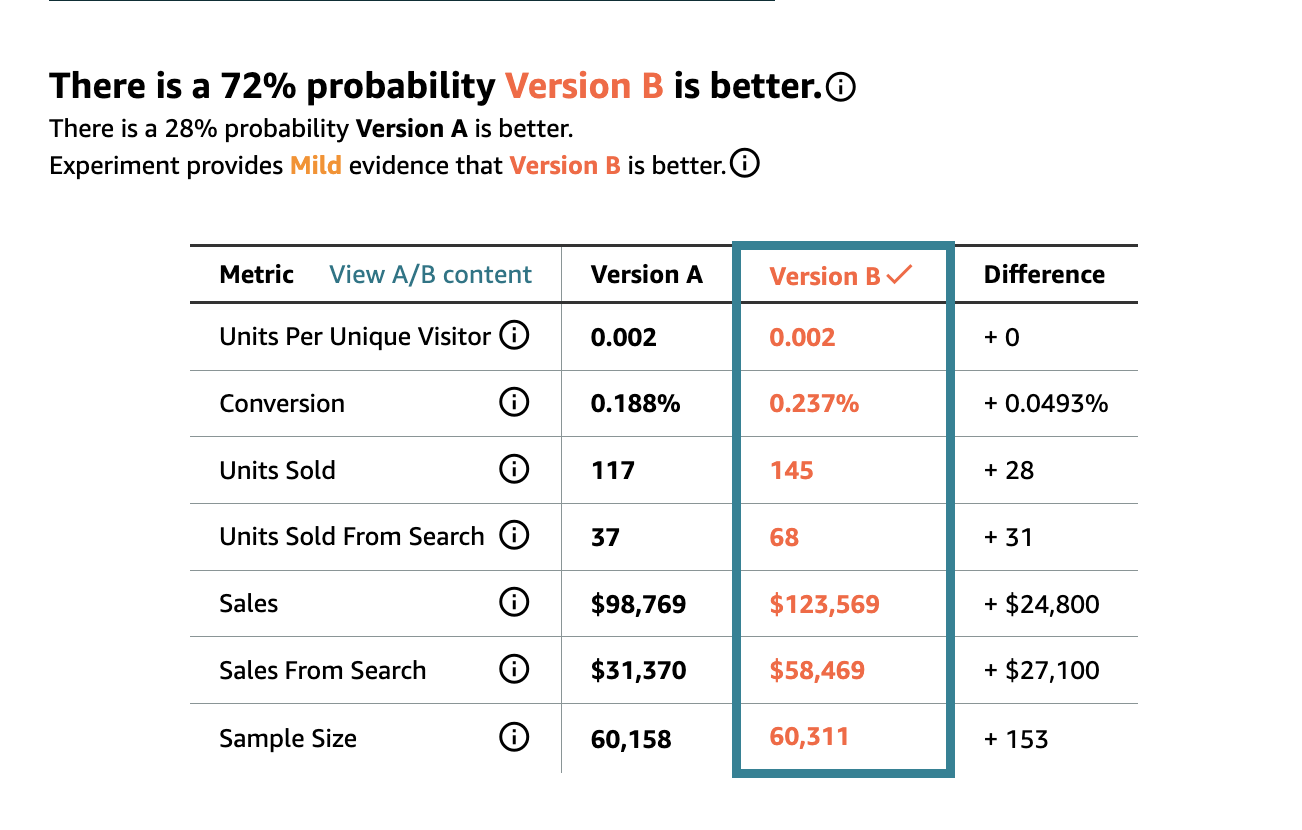
We recently ran a 4-week A/B test. We didn't change the price, the main images, or the ad spend—just the text in the title.
- Search Revenue: Increased by $27,100 (from $31k to $58k)
- Conversion Rate: Improved from 0.19% to 0.24%
- Units Sold from Search: Nearly doubled (from 37 units to 68 units)
While a 0.05% absolute increase looks small on paper, it represents a 26% relative lift in efficiency. That is 26% more revenue for every dollar of traffic we drive.
A better conversion rate doesn't just help organic sales; it directly lifts your ROAS. When your listing converts better, your ad spend works harder. Every click becomes more valuable. This is why listing optimization is an active lever for profitability.
How to Create High-Converting Titles
This 6-step framework helps develop optimized titles, then test them with real data through A/B testing. Amazon provides a free built-in tool—Manage Experiments (available in Seller Central under Brands > Manage Experiments).
Step 1: Data-Backed Keyword Selection
Start with thorough keyword research for the product. If you're running ads, analyse your search term report as well as competitor data for a list. Then look at high-traffic keywords that are highly relevant to the product. When your title aligns with what shoppers are searching for, your search ranking improves with the title match, and shoppers immediately recognize your product as relevant to what they typed.
Step 2: Front-load for Mobile
Place your most critical keywords in the first 80 characters. This optimizes your title for mobile, where the title gets truncated. Optimizing for mobile is crucial—on average over 50% of traffic on Amazon comes from mobile, and many shoppers use the Amazon shopping app.
Step 3: Balance Key Features and Benefits
Shoppers scan your product title when making a buying decision. Showing key benefits and features helps communicate the value they'll get. Don't just describe what your product is—communicate why it matters. Is it waterproof? BPA-free? Portable? Compatible with specific models? These details belong in your title.
Step 4: Clean Formatting & Policy Compliance
A cluttered title is hard to read and may look spammy. Clean text with separators like pipes or dashes creates visual breaks between key information, making it easy for shoppers to scan quickly.
Poor example: Water Bottle Insulated Stainless Steel BPA Free Leak Proof Portable 32oz
Better example: Insulated Water Bottle | Stainless Steel | BPA-Free & Leak-Proof | Portable | 32oz
Avoid keyword stuffing. Don't repeat "Water Bottle" three times—use synonyms instead. This reads better and keeps you safe from Amazon's suppression algorithms.
Step 5: Create 2-3 Variations
As you create new titles, build 2-3 variations. This gives you titles to test one after the other, which keeps your testing regular—and regular testing is key.
Step 6: Test for 3-4 Weeks
A common mistake is running a test for a few days and making a decision based on incomplete data. Short tests capture noise, not signal—weekend versus weekday patterns, promotional periods, and seasonal fluctuations all create variability that can skew results. A proper test requires 3-4 weeks minimum. In high-volume categories you may accumulate sufficient data in 2 weeks, but extending the test helps validate that results are sustainable.
Keep Testing—Incremental Gains Compound
Found a winning title? Don't stop there—test another variation. If your first optimization improves conversion by 0.5%, then another test achieves a further 0.5%, that's not simply 1.0% total—it compounds on your already-improved baseline. Run several tests throughout the year and these incremental improvements compound into substantial revenue growth.
The Bottom Line
Don't ignore your titles. Optimise them to maximize your product conversion. Higher conversion leads to more sales, which leads to higher returns on ad spend, which unlocks growth potential.
At Broadway Ad Consult, we understand that conversion and ad performance are strongly connected. A lift in conversion leads to a better return on every dollar spent. That's why we include listing optimisation—image, title, A+, storefront, and description—as part of the strategy, going beyond just managing ads.